Transform Your Winter Designs with 10 Snow Flake Overlay Backgrounds
When you’re working on a winter campaign or a holiday photo edit, the difference between an amateur result and a professional finish often lies in the details. You might have the perfect model shot or the ideal landscape, but without that atmospheric depth, the image can feel flat. This is where specific design assets come into play. I’ve been using the 10 Snow Flake Overlay Backgrounds pack recently, and it has become a staple in my toolkit for adding that essential "magic" to cold-weather visuals.
Understanding the Visual Character of These Overlays
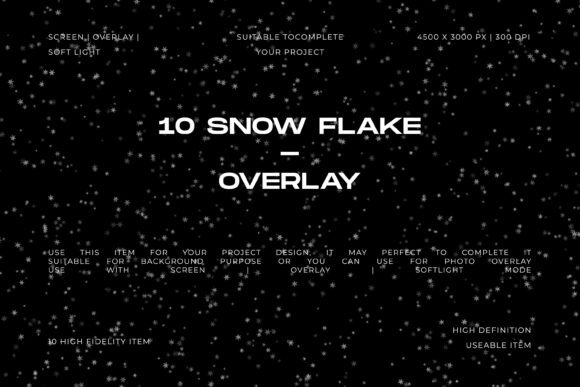
Unlike generic noise filters or basic white specks, these overlays are designed with realism in mind. The collection features soft, natural-looking snow particles scattered against a black background. This specific style is crucial for versatility. The particles are not just uniform dots; they have varying sizes and opacities that mimic actual falling snow. This creates a sense of depth and movement that static backgrounds simply cannot achieve.
The "personality" of these overlays is cinematic and immersive. Because the background is black, they are engineered to be used with blending modes like Screen, Overlay, or Soft Light. This means the black disappears, leaving only the white snow particles floating over your subject. The resolution is a massive 4500 × 3000 px at 300 DPI. This high-quality standard ensures that even if you are working on large-format print designs or 4K video thumbnails, the snowflakes remain crisp and don’t pixelate.
Practical Applications: From Branding to Cinematic Edits
The versatility of the 10 Snow Flake Overlay Backgrounds makes them valuable across a wide range of projects. It isn’t just for photographers; it’s a tool for anyone looking to evoke a seasonal mood. Here is how you can integrate them into your workflow:
- Photo Effects & Retouching: If you shot a portrait in a studio but want to place the subject in a winter wonderland, these overlays add the necessary environmental context. They are particularly effective for holiday cards or seasonal family portraits.
- Social Media Graphics: For marketers and bloggers, seasonal content is king. These overlays can instantly update a generic sale banner or an Instagram post to feel timely and relevant for the winter holidays.
- Video Thumbnails: Content creators on YouTube know that the thumbnail is the gateway to the video. Adding a snow effect to a travel vlog or a gaming thumbnail creates an immediate visual hook that suggests a specific atmosphere.
- Cinematic Compositions: If you are designing a movie poster or a book cover with a thriller or fantasy theme, the subtle addition of falling snow can introduce elements of cold, isolation, or magic.
Influencing Visual Hierarchy and Audience Engagement
Good design is about guiding the viewer's eye. While typography—whether it is a bold sans serif font or an elegant serif font—handles the text, texture handles the mood. Applying a snow overlay is not just decoration; it affects how the viewer perceives the image.
By using the 10 Snow Flake Overlay Backgrounds, you create a foreground layer that adds dimension. This can actually improve visual hierarchy. For instance, placing a layer of snow slightly out of focus in the foreground while keeping the background snow sharp can create a "bokeh" effect that forces the viewer to focus on the central subject. It adds a layer of professionalism to your brand identity when used consistently across winter campaigns, signaling that your brand pays attention to seasonal aesthetics and quality.
Technical Tips for the Best Results
Getting the most out of these design assets requires a bit of technical know-how. Here is my practical advice for implementation:
- Blending Modes are Key: As mentioned, always start by setting your blending mode to Screen. This removes the black background instantly. If the snow looks too faint, try Linear Dodge (Add). If you want a more subtle, misty look, Soft Light works wonders.
- Layering for Depth: Don't just use one layer. Duplicate the overlay, resize one copy to be smaller and place it in the background (perhaps behind your subject), and keep another larger copy in the foreground. This creates a 3D effect.
- Color Grading: Real snow often picks up ambient light. If your scene has warm orange lights, use a clipping mask to add a slight warm hue to the snow particles so they match the environment.
Evaluating Project Fit and Asset Management
When deciding if the 10 Snow Flake Overlay Backgrounds are right for your current project, consider the lighting of your base image. These overlays work best on darker, moodier images or photos with distinct lighting setups. If you apply them to a completely blown-out white background, the effect will be lost because the Screen blending mode relies on contrast.
For those in commercial design or packaging design, these overlays offer a cost-effective way to create seasonal variations of your product shots without reshooting. Imagine a coffee brand wanting to show their winter blend; adding snow to the existing product photo creates a whole new marketing asset in minutes.
Ultimately, the value of this collection lies in its ability to save time while increasing quality. Instead of spending hours trying to paint snow particles manually—which rarely looks natural—you have access to 10 distinct, high-resolution textures ready to drop into your project. Whether you are a graphic designer working on a client project or a hobbyist making holiday gifts, these overlays provide the atmospheric finishing touch that makes a design feel complete.